By Shakiyla Huggins February 18th, 2024

In recent years, gamification has become popular in instructional design, offering engaging and interactive learning experiences. However, amidst the excitement of creating immersive games and activities, it’s crucial not to overlook a fundamental aspect: accessibility. Keep reading to learn about some accessibility features I included in my most recently developed gamfied activity.
I, myself, have to constantly remember not to get lost in the excitement of gamification without actively acknowledging accessibility. Yes – Gamification offers developers and designers many exciting features, but remember, learning must be inclusive and accessible to all individuals, regardless of their abilities or limitations. Ensuring that educational content is accessible to all individuals is not only ethically imperative but also aligns with legal requirements and enhances the overall learning experience for everyone involved.
Web Content Accessibility Guidelines (WCAG)
One of the key frameworks for understanding and implementing accessibility standards is the Web Content Accessibility Guidelines (WCAG). These guidelines, developed by the World Wide Web Consortium (W3C), provide recommendations for making web content accessible. While originally intended for web developers, WCAG principles equally apply to instructional designers, especially those working on e-learning modules.
Understanding WCAG:
As mentioned, WCAG is a globally recognized set of guidelines developed to ensure that web content is accessible. These guidelines are organized around four principles:
- Perceivable: Information and user interface components must be presented in a way that users can perceive.
- Operable: User interface components and navigation must be operable.
- Understandable: Information and the operation of the user interface must be understandable.
- Robust: Content must be robust enough to be interpreted reliably by various user agents, including assistive technologies
Applying WCAG to Gamified Instructional Design:
When creating gamified instructional content, especially with tools like Articulate Storyline, it’s essential to consider how WCAG principles can be applied to ensure accessibility. Here are some examples:
Perceivable:
- Provide text alternatives for all non-text content, including images, videos, and interactive elements.
- Ensure that gamified elements, such as instructions and prompts, are presented in multiple modalities (e.g., visual, auditory).
Operable:
- Design gamified interactions and controls to be operable via keyboard input.
- Allow users to adjust the timing of game elements or turn off time constraints altogether to accommodate users needing more time to process information or respond to prompts.
Understandable:
- Keep gamified instructions and feedback clear and concise, using plain language whenever possible.
- Provide consistent navigation and feedback throughout the game to help users predict how interactions will behave and learn from their experiences.
Robust:
- Use web technologies and standards compatible with a wide range of assistive technologies.
Let’s Look at an Example!
In my latest gamfied activity, I adapted a simple drag-and-drop activity to include gamified elements such as loss aversion, timers, points, and difficulty levels. While designing, I carefully included as many accessibility features as possible. Let’s talk about them.
Closed Captions
One of the most commonly used forms of accessibility is closed captions.
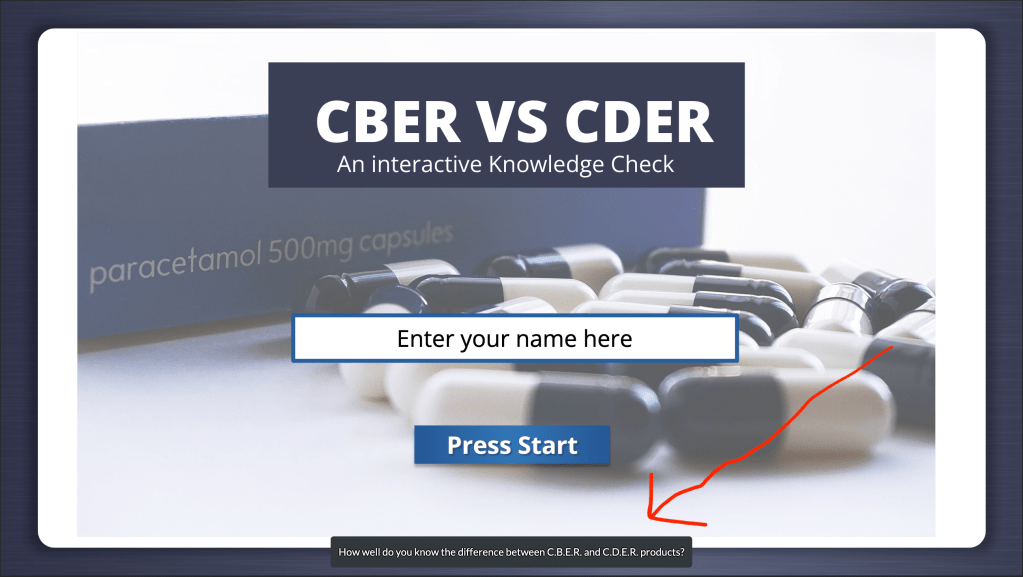
Every slide and interaction I incorporated in this gamified experience is accompanied by audio and closed captions. Users are given directions that are both read to them via audio with closed captions and shown on their screen. These accessibility measures ensure that the content is perceivable to all!
Click instead of Hover
Next, let’s talk about the design of the “Choose your difficulty” page.

Upon initial conception, I designed this page in a hover format. Users could hover their mouse over each icon next to the difficulty levels to read about the game experience they would encounter. Not only was this inaccessible for users who may only be using the tab key on their keyboard, but it was also impossible to add audio with closed captions. Therefore, I redesigned this page so users could click on each icon instead of hovering, opening the slide to a layer that included audio, and enable closed captions. This accessibility measure ensures that content is understandable and operable.
Audio and Visual Cues for Feedback
Finally, my favorite design in this experience for accessibility was attaching audio and visual cues as feedback!
While designing, it was very important for the user to receive immediate feedback while in their gamified experience. I wanted users to know immediately when a drop was correct or incorrect. My first iteration of this design only includes color feedback. Users could see their drop turn green if it was correct or red if it was incorrect. But as we’ve learned, color alone is not accessible. So, I added two things: audio and visual feedback.
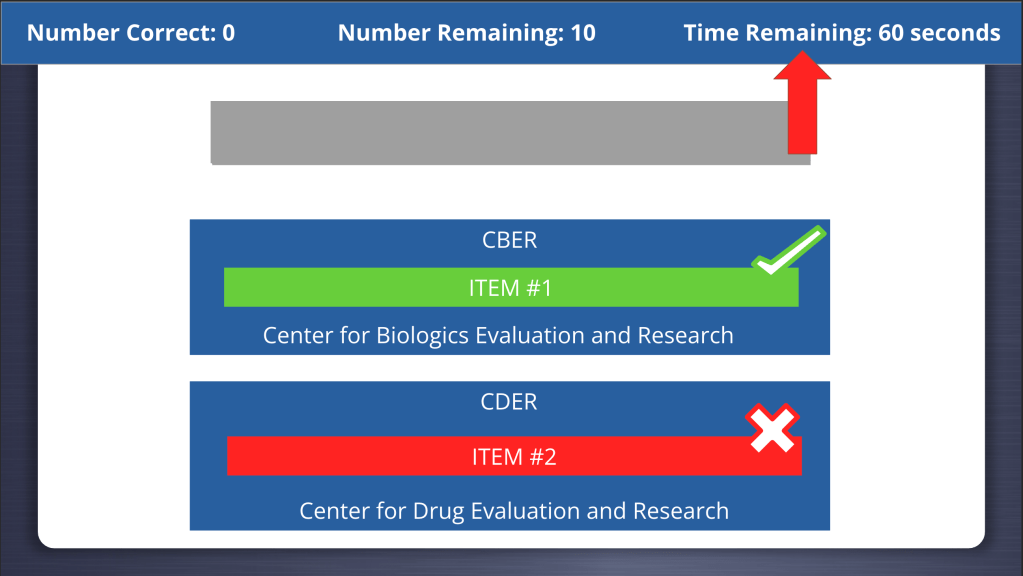
Now, users receive a “checkmark” with audio that says “correct” when their answer is correct, and their feedback turns green, or an “x” with audio that says “not quite” when their answer is incorrect and their feedback turns red.
Conclusion:
As I continue my instructional design journey, I am excited to learn more ways to include accessible features, including ways I plan to adapt this specific experience further. By prioritizing accessibility in gamified instructional design through adherence to WCAG principles, developers can create inclusive learning experiences that benefit learners of all abilities. Remember, accessibility isn’t an add-on; it’s an integral part of the design process that fosters equity and inclusivity in learning. So, the next time you embark on gamifying your instructional content, ask yourself: Are you prioritizing accessibility with WCAG in mind?
Introduction to Understanding WCAG 2.1. (n.d.). http://Www.w3.org. https://www.w3.org/WAI/WCAG21/Understanding/intro#understanding-the-four-principles-of-accessibility
 Gamifying your Designs Through Self-Determination
Leave a comment